

If your IPTV suddenly stopped working on Etisalat in the UAE, you are not alone. Many users in Dubai, Abu Dhabi, Sharjah, and other Emirates regularly experience IPTV buffering, black screens, loading errors, freezing channels, or apps that simply refuse to open. If you are new to Internet Protocol television, it works by delivering TV content through internet connections instead of traditional satellite or cable systems.
In most cases, the issue is not your TV or internet speed alone. Problems can happen because of ISP routing, DNS filtering, overloaded IPTV servers, outdated apps, weak WiFi signals, or provider-side outages. The good news is that most IPTV issues on Etisalat can be fixed within minutes if you know the real cause.
This guide explains:
- Why IPTV stops working on Etisalat
- The most common IPTV errors in UAE
- Step-by-step fixes
- Best IPTV settings for Etisalat
- How to reduce buffering
- Which IPTV apps work better in UAE
Why IPTV Stops Working on Etisalat
There are several reasons IPTV may fail on Etisalat connections.
The most common causes include:
| Problem | Possible Cause | Difficulty to Fix |
|---|---|---|
| Buffering | Slow routing or overloaded IPTV server | Easy |
| Black screen | App codec issue or blocked stream | Medium |
| Channels not loading | DNS filtering or provider issue | Easy |
| IPTV app crashing | Outdated app/cache problem | Easy |
| Login failed | Expired subscription or wrong credentials | Easy |
| IPTV works on mobile but not WiFi | ISP filtering or router settings | Medium |
| Freezing during sports | Peak-hour congestion | Medium |
Common IPTV Problems on Etisalat
IPTV Buffering Constantly
Buffering is the most common complaint among UAE IPTV users. This usually happens because:
- IPTV servers are overloaded
- WiFi signal is weak
- Etisalat routing creates high latency
- Too many devices use the same network
- The IPTV provider uses servers outside the Middle East
Quick Fixes
- Restart your router
- Use Ethernet instead of WiFi
- Switch to 5GHz WiFi
- Reduce stream quality from 4K to HD
- Clear IPTV app cache
- Test another IPTV player
For deeper troubleshooting steps, check our complete guide on How to Fix IPTV Buffering in Dubai to improve streaming stability and reduce constant freezing issues.
IPTV App Not Opening
Sometimes IPTV Smarters, TiviMate, or other IPTV apps refuse to open on Etisalat networks. Possible causes:
- Corrupted app cache
- DNS blocking
- App version outdated
- IPTV server downtime
Fix
- Clear app cache and data
- Reinstall the IPTV app
- Update to the latest version
- Restart the device
- Change DNS settings
Black Screen on IPTV
A black screen usually means:
- Unsupported video codec
- Dead stream
- IPTV server issue
- Hardware decoder conflict
Solution
Go to:Settings > Player Settings
Then:
- Switch from Hardware Decoder to Software Decoder
- Restart the app
- Test another channel
How to Fix IPTV Not Working on Etisalat
Restart Everything
This simple step fixes many IPTV issues.
Restart:
- Router
- IPTV app
- Firestick/Android box
- Smart TV
Wait 30 seconds before reconnecting.
Change DNS Settings
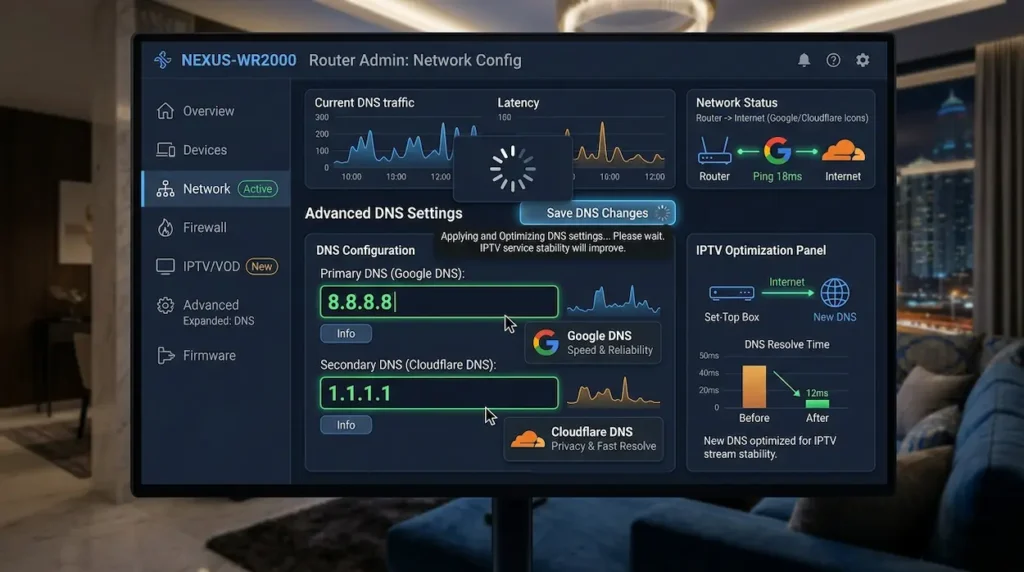
Etisalat DNS routing may occasionally create connection or filtering issues for some IPTV services.
Best DNS Options
| DNS Provider | Primary DNS | Secondary DNS |
|---|---|---|
| Google DNS | 8.8.8.8 | 8.8.4.4 |
| Cloudflare DNS | 1.1.1.1 | 1.0.0.1 |
How to Change DNS
- Open router settings
- Find DNS section
- Replace default DNS
- Restart router
This alone solves IPTV loading problems for many UAE users.
Use Ethernet Instead of WiFi
WiFi interference is one of the biggest causes of IPTV buffering.
Ethernet provides:
- Lower latency
- Stable streaming
- Faster speeds
- Less packet loss
If possible:
- Connect Firestick or TV box directly to the router
Check Internet Speed
For smooth IPTV streaming on Etisalat:
| Streaming Quality | Minimum Speed | Recommended Speed |
|---|---|---|
| SD | 5 Mbps | 10 Mbps |
| HD | 15 Mbps | 25 Mbps |
| 4K | 30 Mbps | 50+ Mbps |
Even if you have fast internet, congestion during peak hours can still affect IPTV performance.
Test Another IPTV App
Sometimes the problem is the IPTV player itself.
Best IPTV Apps for UAE Users
- IPTV Smarters Pro
- TiviMate
- XCIPTV
- OTT Navigator
- GSE Smart IPTV
If one app buffers constantly, test another player before blaming the provider.
Clear IPTV Cache
Large cache files can slow apps and cause freezing.
On Firestick
Go to:Settings > Applications > Manage Installed Applications
Then:
- Select IPTV app
- Clear cache
- Restart app
Is Etisalat Blocking IPTV?
This is one of the most searched questions in the UAE. The UAE has strict internet regulations, and some unlicensed IPTV services may become inaccessible or unstable depending on provider routing and network filtering policies.
However, not every IPTV issue means deliberate blocking. Most failures are actually caused by:
- Cheap IPTV providers
- Oversold servers
- Poor routing
- Weak hardware
- App configuration issues
Best IPTV Setup for Etisalat Users in UAE

Here is the recommended setup for stable IPTV streaming.
| Component | Recommendation |
|---|---|
| Internet | Etisalat Fiber 250 Mbps+ |
| Connection | Ethernet preferred |
| Router Band | 5GHz WiFi |
| IPTV App | TiviMate or IPTV Smarters |
| DNS | Cloudflare 1.1.1.1 |
| Streaming Device | Firestick 4K Max or Android Box |
| VPN | Only if legally permitted and necessary |
IPTV Keeps Buffering During Live Sports

Live sports streams need stable bandwidth. Buffering during football matches or UFC events often happens because:
- Too many users join one server
- IPTV provider oversells subscriptions
- Server capacity becomes overloaded
Fixes
- Lower stream quality temporarily
- Use Ethernet
- Close background apps
- Restart router before matches
- Use IPTV providers with Middle East servers
IPTV Not Working Only on Etisalat WiFi
If IPTV works on mobile data but fails on Etisalat WiFi:
Possible causes:
- DNS filtering
- Router firewall
- ISP routing issue
- IPTV URL blocking
Try These Steps
- Change DNS
- Restart router
- Use another IPTV player
- Update IPTV playlist
- Test another internet connection
Best Practices to Prevent IPTV Problems
Keep Apps Updated
Outdated apps create compatibility issues.
Avoid Cheap IPTV Providers
Very cheap IPTV subscriptions often overload servers.
Use Modern Streaming Devices
Older Android boxes struggle with HD and 4K streams.
Restart Router Weekly
This refreshes memory and improves stability.
Avoid Overloaded WiFi Networks
Too many connected devices reduce IPTV performance.
IPTV Troubleshooting Checklist
Before contacting support, check this list:
- Internet working properly
- IPTV subscription active
- App updated
- Cache cleared
- DNS changed
- Ethernet tested
- Router restarted
- Another IPTV app tested
- Another device tested
- IPTV provider servers online
FAQ
Why is IPTV not working on Etisalat?
Usually because of server overload, DNS routing, app problems, internet congestion, or IPTV provider issues.
Does Etisalat block IPTV in UAE?
Some unlicensed IPTV services may face connectivity issues or filtering under UAE internet regulations.
How do I stop IPTV buffering on Etisalat?
Use Ethernet, change DNS, restart the router, reduce stream quality, and use a reliable IPTV provider.
Which DNS is best for IPTV on Etisalat?
Cloudflare DNS (1.1.1.1) and Google DNS (8.8.8.8) are commonly recommended.
Why does IPTV work on mobile data but not WiFi?
This may happen because of router settings, DNS filtering, or ISP routing issues.
Which IPTV app works best on Etisalat?
TiviMate and IPTV Smarters are among the most popular IPTV apps for UAE users.
Final Thoughts
If your IPTV is not working on Etisalat, do not panic. In most cases, the issue can be fixed quickly without changing your internet provider. The most effective fixes usually include:
- Changing DNS
- Using Ethernet
- Restarting devices
- Updating IPTV apps
- Choosing better IPTV servers
For UAE users, network routing and IPTV provider quality matter much more than raw internet speed. A stable IPTV experience depends on:
- Good infrastructure
- Proper setup
- Reliable IPTV apps
- Optimized streaming configuration
Once these areas are fixed, IPTV streaming on Etisalat can become smooth and reliable again.
