
If you’re looking to install IPTV on Smart TV in UAE, you’re not alone. With rising cable costs and limited channel flexibility, more users in Dubai and across the UAE are switching to IPTV for a better streaming experience.
The good news is that you don’t need a Firestick or external device anymore. Modern Smart TVs like Samsung (Tizen OS) and LG (webOS) allow you to run IPTV apps directly.
This guide is built for IPTV Samsung Dubai users and LG Smart TV owners in UAE, covering everything from setup to troubleshooting so you can enjoy buffer-free streaming.
What is IPTV Smart TV UAE & How It Works
IPTV (Internet Protocol Television) delivers TV content using your internet connection instead of satellite or cable networks.
When you use IPTV on a Smart TV, you simply install an IPTV player app and connect it to your subscription.
How IPTV Works on Samsung & LG Smart TVs
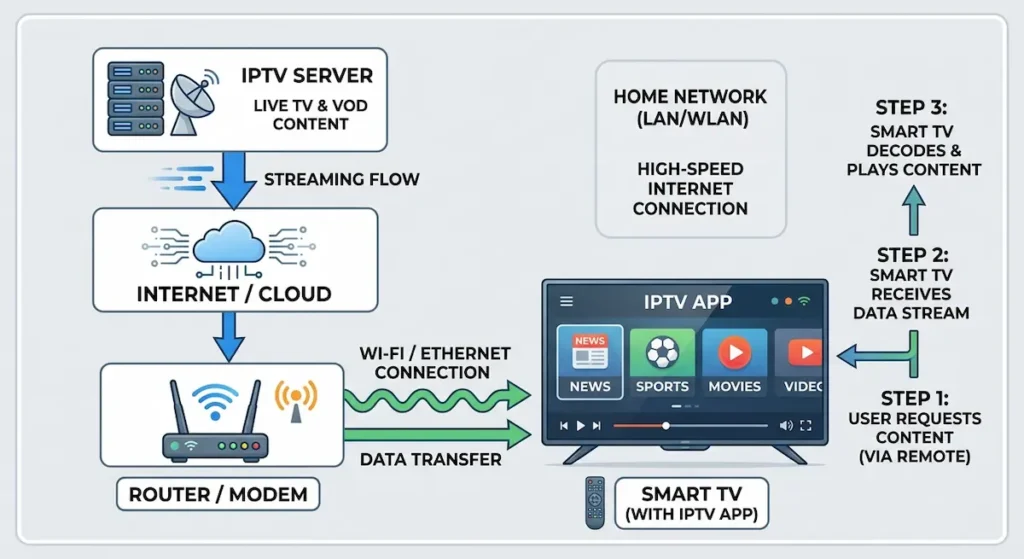
- Install IPTV app from TV store
- Enter M3U playlist or Xtream Codes
- Stream live TV, sports, and movies
Unlike traditional TV, IPTV allows on-demand streaming and global channel access. Modern Smart TVs like Samsung and LG come with built-in app stores that allow users to install IPTV applications directly.
Why IPTV is Popular in Dubai & UAE
- Access to international channels
- Affordable compared to cable TV
- Supports HD and 4K streaming
- No extra hardware required
Is IPTV Legal in UAE? (Important for Smart TV Users)
Before setting up IPTV, it’s important to understand the legal side in the UAE.
Legal vs Illegal IPTV Services
- Legal IPTV: Licensed content providers
- Illegal IPTV: Unauthorized or pirated streams
How to Use IPTV Safely in UAE
- Choose trusted IPTV providers
- Avoid extremely cheap subscriptions
- Ensure secure connection
IPTV technology itself is legal, but the service provider determines compliance. Before using any IPTV service, it’s important to understand the rules. You can read our full guide on Is IPTV Legal in Dubai & UAE? (Complete Beginner’s Guide) to stay safe and compliant.
Requirements to Set Up IPTV on Samsung & LG Smart TV in UAE
To ensure smooth installation, you need a few essentials.
Internet Speed Requirements for IPTV UAE
- SD Quality: 10 Mbps
- HD Quality: 20 Mbps
- 4K Streaming: 30+ Mbps
A stable connection is more important than raw speed.
Compatible Smart TVs
- Samsung Smart TV (Tizen OS)
- LG Smart TV (webOS)
IPTV Subscription Details
You will need:
- M3U URL or Xtream Codes
- Active IPTV subscription
What is an M3U Playlist?
An M3U playlist is a file or URL that contains all IPTV channels and streaming links.
How to Set Up IPTV on Samsung Smart TV (IPTV Samsung Dubai Guide)
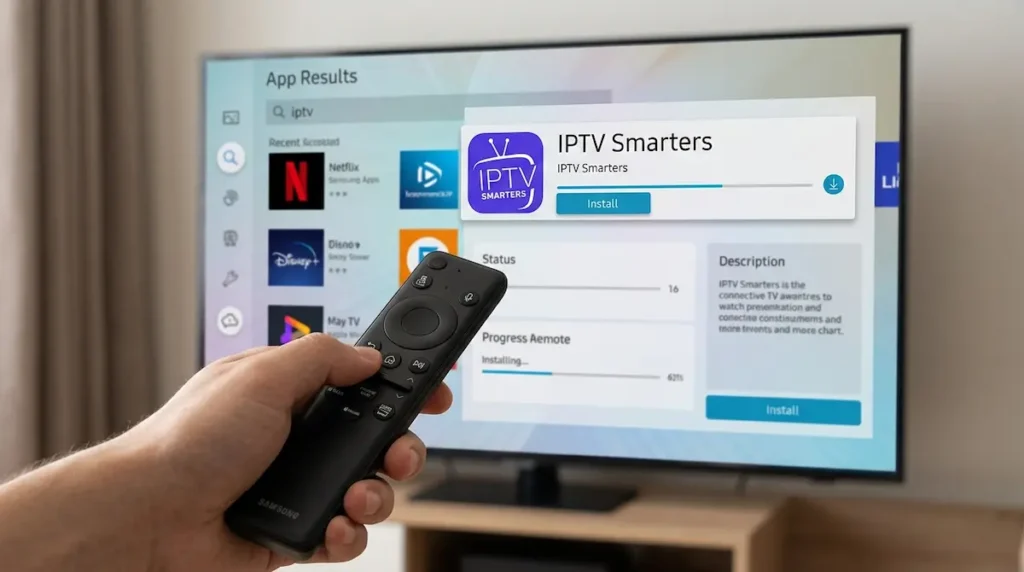
Setting up IPTV on Samsung TVs is simple if you follow these steps.
Step 1: Install IPTV App on Samsung Smart TV
- Open Smart Hub
- Navigate to Apps
- Search for “IPTV Smarters” or “Smart IPTV”
- Install the app
Step 2: Add IPTV Playlist
- Open the app
- Copy MAC address (if required)
- Upload M3U playlist via app website or enter login details
Step 3: Activate IPTV App
- Restart the app
- Channels will load automatically
Fix Samsung IPTV Issues
IPTV App Not Working
- Restart TV
- Check internet connection
- Update firmware
M3U Playlist Not Loading
- Double-check URL
- Contact provider
- Clear app cache
How to Set Up IPTV on LG Smart TV
LG Smart TVs also support IPTV apps with a similar setup process.
Step 1: Install IPTV App
- Open LG Content Store
- Search for IPTV apps
- Install IPTV Smarters or Smart IPTV
Step 2: Add IPTV Details
- Open the app
- Enter M3U URL or Xtream Codes
- Save settings
Step 3: Start Streaming
- Refresh channels
- Enjoy IPTV content
Fix IPTV Issues on LG Smart TV
Buffering Problem
- Use Ethernet instead of WiFi
- Close background apps
App Crashing
- Reinstall app
- Update TV software
Best IPTV Apps for Smart TV UAE (Samsung & LG)
Choosing the right IPTV app improves performance and user experience.
Top IPTV Apps
- IPTV Smarters Pro (best for beginners)
- Smart IPTV (stable and reliable)
- SS IPTV (free option)
- Flix IPTV (modern interface)
IPTV Apps Comparison Table (Smart TV UAE)
| Feature | IPTV Smarters | Smart IPTV | SS IPTV | Flix IPTV |
|---|---|---|---|---|
| Ease of Use | Very Easy | Moderate | Easy | Very Easy |
| Supported TVs | Samsung & LG | Samsung & LG | LG Mostly | Samsung & LG |
| Free/Paid | Free | Paid | Free | Paid |
| Performance | High | Very High | Medium | High |
| Best For | Beginners | Stability | Budget Users | UI Lovers |
How to Fix IPTV Buffering in UAE (Smart TV Guide)
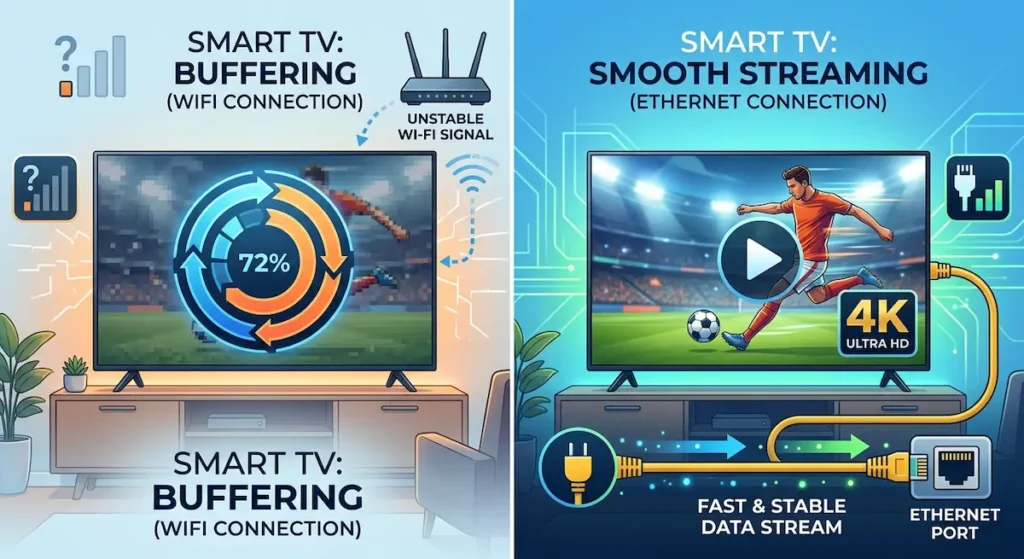
Buffering is one of the biggest issues for IPTV users in UAE.
Common Causes
- Slow internet
- ISP throttling
- Poor IPTV server
Best Fixes for IPTV Buffering UAE
- Use high-speed internet (30+ Mbps)
- Switch to Ethernet cable
- Restart router regularly
Advanced Optimization Tips
Best DNS Settings
- Google DNS: 8.8.8.8
- Cloudflare DNS: 1.1.1.1
WiFi vs Ethernet
- WiFi: Convenient but unstable
- Ethernet: Faster and more reliable
Samsung vs LG Smart TV for IPTV UAE (Full Comparison)
| Feature | Samsung Smart TV | LG Smart TV |
|---|---|---|
| Operating System | Tizen | webOS |
| Performance | Faster | Smooth |
| App Support | Excellent | Very Good |
| Ease of Use | Moderate | Easy |
| IPTV Experience | Best Overall | Very Good |
Which is Better for IPTV in UAE?
- Samsung: Better performance and speed
- LG: Easier interface and navigation
Common IPTV Setup Mistakes to Avoid
Avoid these mistakes to get the best IPTV experience:
- Using low-speed internet
- Choosing unreliable IPTV providers
- Entering incorrect M3U playlist
- Ignoring software updates
FAQs – IPTV Smart TV UAE Setup
Can I use IPTV on Samsung Smart TV in UAE?
Yes, Samsung Smart TVs fully support IPTV apps.
Which IPTV app is best for LG Smart TV UAE?
IPTV Smarters and Smart IPTV are the most recommended.
Do I need VPN for IPTV in Dubai?
Not required, but it can improve performance and privacy.
Why is IPTV buffering on my Smart TV?
Usually due to slow internet or poor IPTV servers.
Is IPTV better than cable TV in UAE?
Yes, IPTV offers more flexibility, better pricing, and global content access.
Final words – Best IPTV Smart TV Setup in UAE
Setting up IPTV on Smart TV in UAE (Samsung & LG) is one of the easiest ways to upgrade your home entertainment system.
With the right IPTV app, a stable internet connection, and a reliable provider, you can enjoy seamless streaming without interruptions.
To get the best results:
- Use Ethernet connection
- Choose a high-quality IPTV provider
- Optimize your TV settings
Once everything is configured, your Smart TV becomes a powerful streaming hub with unlimited content options.
